

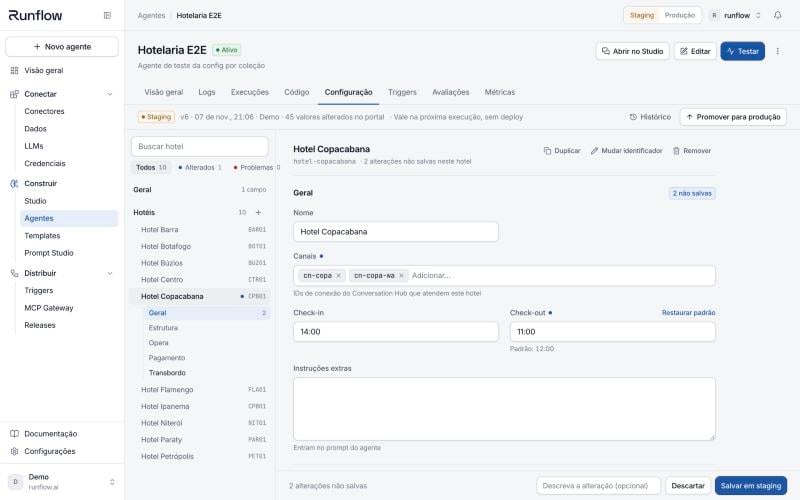
The Configuration tab of an agent that serves several hotels
Agent Config is rolled out per workspace. If an agent declares a manifest but you don’t see the
Configuration tab, ask Runflow to enable it for your workspace. The code side works either way:
the defaults you declare are always delivered to the agent.
How it works
You describe the config with a Zod schema inmanifest/index.ts. When you deploy,
the CLI turns it into agent.manifest.json, the platform builds a form from it, and every execution
receives the resolved values. Inside the agent you read them with config().
Values come from three layers. The higher layer wins, field by field:
A field nobody touched shows its default in the portal. A field changed in the portal is marked
as changed and can be restored to the default with one click.
Quick start
1
Declare the schema
Create
manifest/index.ts. The default export is defineManifest({ config }).manifest/index.ts
2
Read it in the agent
Import the manifest once in your entry file, then call
config() wherever you need the values.main.ts
3
Deploy
agent.manifest.json from manifest/ and ships it with the code. If the schema
or a JSON file in manifest/ is invalid, the deploy stops before uploading anything.4
Edit in the portal
Open the agent, go to Configuration, change a value and click Save in staging. The next
staging execution already sees it. When it looks right, click Promote to production.
From schema to form
The portal renders each Zod type with a matching control. You don’t write any UI.
Everything you put in
.meta({...}) shapes how the field is shown:
Conditional field
Collections: one agent, many units
When one agent serves several stores, hotels, clinics or brands, declare a collection withz.record. Each item gets its own form, and the team adds a unit in the portal without touching code.
manifest/index.ts
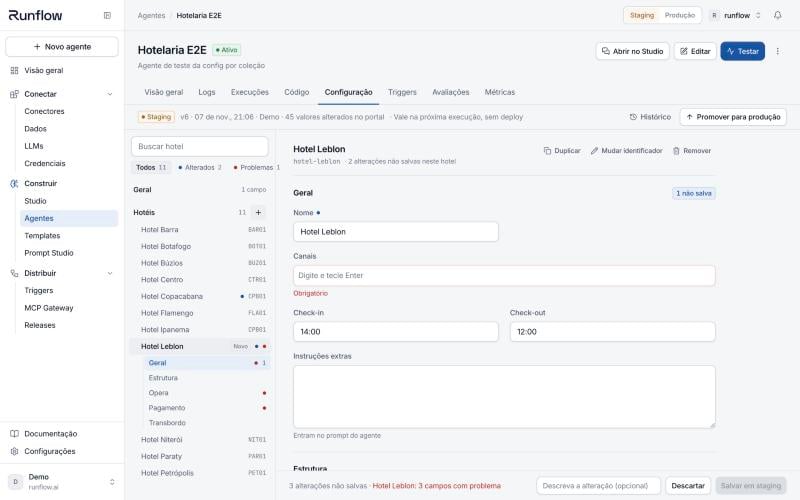
A new item with required fields still empty: the save is blocked and the list marks the item
- The key is the item id. The portal suggests it from the name (
Hotel Copacabanabecomeshotel-copacabana). Use it in code and in logs. Keys can’t contain.. - Defaults apply inside each item. A field with
.default()in the item schema is filled for every item, including items added later in the portal. - Duplicate copies every field, including ids such as channel or branch codes. Change those before saving.
- Items can be declared in the repository too. An item in
manifest/staging.jsonshows up in the portal, where the team can adjust its fields. It can’t be removed from the portal, since the repository would bring it back on the next deploy. - Always add
.default({})to the collection, so the agent gets{}and notundefinedbefore the first item exists.
Environments, promotion and history
Config follows the same environments as the rest of the platform:- Staging is where you edit. Save in staging creates a new version and it applies on the next staging execution.
- Production is read-only in the tab. It changes only through Promote to production, which shows exactly which fields change before you confirm. Promoting requires an admin of the workspace.
- History lists every version with author, date and message, the diff against the previous one, and Restore, which creates a new version with the old values. Nothing is overwritten.
manifest/staging.json
Reading request metadata
Agents that pick a unit per request need something from the incoming request, like a store id or the number that received the message.readMetadata(input) merges the metadata of the execution
input with the metadata sent in the request body by HTTP triggers, so the same code works for the
portal tester, the CLI and real traffic.
The Conversation Hub sends the WhatsApp number as
phoneNumberId at the top of the request body,
not inside metadata. Read it from input.request?.body?.phoneNumberId; the
multi-unit guide shows how to support both.manifest/index.ts
manifest/fixtures/*.json, as an array of { name, description?, metadata }.
Use fictional data: the CLI warns when a fixture looks like a real e-mail or phone number.
CLI
Inspecting what the agent received
configInfo() tells you which version an execution ran with. Log it next to your business events
and you can tell later which settings produced a given answer.
stale: true shows up, the execution ran on a version of the code whose manifest differs from
the one the config was saved for. That happens briefly right after a deploy that changed the schema;
saving once in the portal clears it.
Limits and good practices
- The resolved config of one environment can be up to 192 KB. That fits dozens of units with long prompt instructions. If you need more, the data probably belongs in a KV store or a knowledge base.
- Config is not a secret store. Anyone who can open the agent can read it. Keep API keys and passwords in Credentials and reach them through connectors.
- Validate in the schema, not in the agent. A
.min(1)or.max(168)in the schema blocks a bad value in the portal before it reaches production. - Removing or renaming a field is a breaking change. Values saved for a field that no longer exists are ignored and listed as invalid in the tab, so rename in two steps: add the new field, migrate, then remove the old one.
- When the values don’t match the schema (for example, after a type change),
config()logs a warning in the execution output and uses the values over the code defaults. Check the execution logs after changing a field’s type.
FAQ
Do I need to redeploy after saving in the portal?
No. The next execution reads the new version.Who can change the config?
Members of the workspace can save in staging. Promoting to production and restoring a production version require an admin.What happens to executions already running when I save?
They finish with the values they started with. Only new executions see the new version.Can I use a JSON Schema instead of Zod?
Yes.defineManifest({ config }) also accepts a plain JSON Schema object. You lose type inference
and Zod transforms in config().
Next steps
One agent for many units
A hotel chain served by a single agent, routed by WhatsApp number
Environments
How staging and production are separated